.jpg)
Every new AI tool an organization adopts is another way for data to leave it. Although most of the AI risk focus is on what employees paste into AI tools, the connections between those tools and other corporate systems may matter just as much. And crucially, security teams rarely have visibility into these connections, or the data that flows through them.
Claude's Connectors are one example—and the subject of this research. Connectors are Claude's implementation of the Model Context Protocol (MCP), the de facto standard for wiring AI agents into outside systems. In a corporate environment, an admin decides which ones an organization can use, approving existing systems like Slack or Google Drive and denying the rest. That approval controls which connectors exist. But as our research shows, it doesn't control which Claude account ends up holding one.
What We Found: Account Confusion Risk
We found that a personal Claude account can easily be granted access to corporate data through an organization-approved MCP connector. The connection can occur by accident, or a user can create it maliciously to exfiltrate data from the organization. Either way, the organization has no way to see it happening.
Here's a sample scenario:
- John Smith works at Acme Corp and has a corporate Slack account.
- Acme has approved the Slack connector for organizational use, granting Claude permission to read Slack channels and messages.
- John switches to his personal Claude account, johnsmith@gmail.com.
- John adds the Slack connector under his personal account, intentionally or by mistake.
- Slack asks John, via the browser, to consent to connect Claude. John approves.
Once authentication completes, John's personal Claude account can access corporate Slack.
What's at Stake
This poses three risks:
- Bypass of no-training policies: Personal chats with Claude pull corporate data from the MCP server. The data is no longer covered by the corporate account's policies, such as the LLM provider's no-training policies.
- Permanent data exposure: Chat history is stored on Claude's servers and synced everywhere the personal account is used, whether in the app or web. The employee retains access to the data on any personal device, even after leaving the company. The data has leaked permanently.
- Third-party risk: The personal account may be connected to other MCPs the organization has never vetted. Claude can pull corporate data and send it to them.
How Account Confusion Can Happen
When a user adds the Slack Connector in their Claude settings, Slack asks them to approve access for Claude. The consent screen is identical regardless of which Claude account is being used. The same logo, text, and scopes appear whether the user is in a corporate account or a personal one. As you can see below, there is no visual cue tying the OAuth grant to the Claude account that will actually own it.
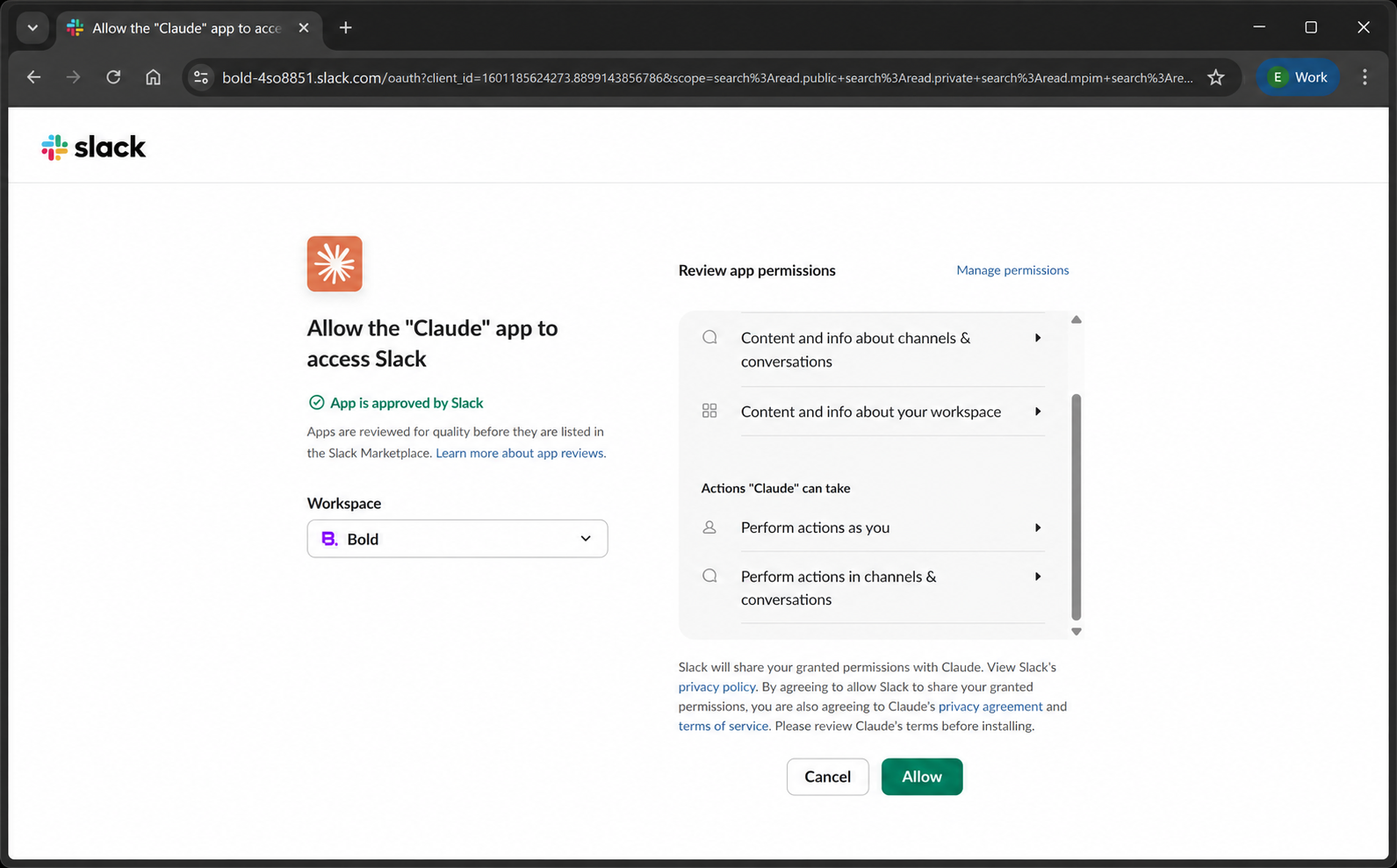
The confusion is especially likely for users who run browser profiles side by side: one window on a personal profile, one on a corporate profile, each signed into its corresponding Claude account.
Note: It's less likely to happen by mistake in Claude Desktop, where the active browser's Claude identity has to match the Claude Desktop identity for the authorization to go through. It can still be done on purpose.
The consent screen gives the user no indication of which account they're in. The reason it can't is architectural. Deep dive below.
Technical Deep Dive
Claude doesn't connect to MCP servers directly; a proxy on Anthropic's servers performs the OAuth flow and holds the tokens for everyone. It also handles every MCP call and forwards it to the destination server. The oauth authorization presents the same client identity to Slack, so it has no way to know, or show, which Claude account is behind a grant. The account binding happens silently on Anthropic's side.
A short introduction to OAuth
OAuth 2.0 is a standard authorization framework. It lets a user (the resource owner) authorize a client application (the OAuth client) to access a resource server on their behalf, built on trust between the authorization server and the resource server.
In this case, the resource owner is the Slack user, the OAuth client is claude.ai (the MCP proxy), the authorization server is slack.com, and the resource server is mcp.slack.com.
The MCP proxy
For organizational MCPs (web connectors), Anthropic mediates all MCP requests through a dedicated endpoint. The browser does not access mcp.slack.com directly. It goes through Anthropic's claude.ai proxy server.
Here is the confusion flow when using claude.ai in the browser (a similar flow, activating the external browser, exists from Claude Desktop):
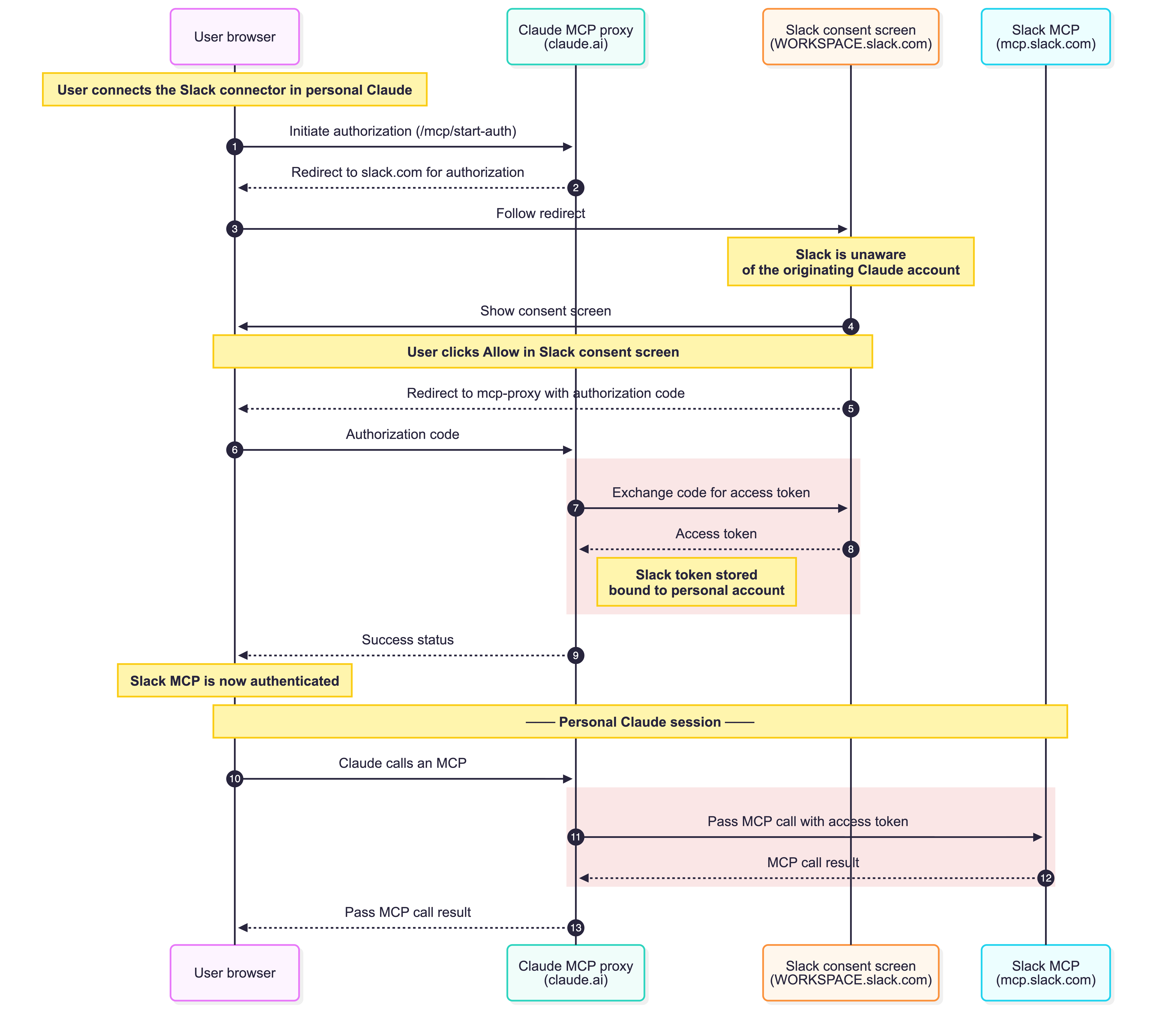
When the user first connects the Slack MCP to Claude, the browser goes to a dedicated /mcp/start-auth URL to initiate the authentication [1]. The MCP proxy (claude.ai) then initiates the authorization process [2] and redirects the user to the Slack consent screen. At this point, Slack sees the MCP proxy’s client ID and can’t tell what the originating account is and presents the same consent screen [4]. The user, either mistakenly or on purpose, approves the connection. The MCP proxy fetches the access token [7] from Slack and stores it, bound to the personal Claude account. That part doesn't go through the browser. Finally, the proxy returns a simple success status to the browser session [9].
Even though it looks like the browser is talking directly to Slack's MCP, every request is proxied through the MCP proxy, which attaches the token to the remote request [11]. The long-lived tokens live on Anthropic's servers, get refreshed there, and gate every call. Anthropic sees every request, and the personal Claude account gets permanent access to the MCP.
One client identity for everyone
This proxy design is the source of the account confusion. Slack cannot tell, or show, who the Claude user behind the call is.
The OAuth client is the MCP proxy, and it makes the calls for everyone. Slack only ever sees a single OAuth client_id (1601185624273.8899143856786). This client ID is the same across every Anthropic user, every Anthropic org, and every Claude desktop install. The binding between the grant and a Claude account is decided silently on Anthropic's servers, based on the active Claude session and tool ID.
The OAuth protocol has no concept of which "source user" initiated the flow. It knows the client and the Slack user, nothing more. That is why the consent screen cannot warn anyone: from Slack's side, every connection looks the same.
It is worth noting this is not the case with a custom remote MCP server configured through the app. Those are handled through a loopback port, and the client that initiates is essentially the desktop app.
What Security Teams Can Do
There's no obvious place to catch this. The OAuth handshake and the traffic are both legitimate; every grant comes from the same client identity, and every the OAuth session looks the same on the network.That leaves a few practical steps:
- Educate users on the risk involved with MCPs; how risky it is to connect corporate MCPs to personal accounts, and in general about data leak risk involved with MCPs.
- Educate users on the account boundary. Most employees don't know a personal account can hold a corporate grant, or that the consent screen won't warn them. It's the cheapest control available.
- Treat mixed browser profiles as a risk surface. Side-by-side personal and corporate profiles are where this mistake is most likely to happen.
- Get visibility at the endpoint. The device is the one place personal and corporate accounts are actually distinguishable, where the session, profile, and signed-in account live.
Conclusion
A simple account confusion in Claude can trigger serious corporate data exposure. A careless user can make the connection by mistake, or, worse, a malicious one can use it to quietly move data out of the organization.
Once a connector is authorized to the wrong account, corporate data flows into a personal session, and no perimeter control will notice. The gap here isn't a misconfiguration or a policy failure. The layers where organizations enforce policy, the SaaS side and the network, structurally cannot see which account is in the window. Only the endpoint can.
Bold brings the endpoint's unique viewpoint to AI data loss prevention: understanding not just what data is moving, but the full application context around it. In this case, which MCP is connected to which AI tool, and whether that connection sits under a personal or corporate account. This visibility spans every surface where AI shows up: the browser, native desktop apps like Claude Desktop, and the terminal for agentic tools like Claude Code.
Because AI tools and agents can move enormous volumes of data quickly, and often obscure where that data originated, reacting at the moment of exfiltration isn't enough on its own. Bold takes a proactive approach as well: identifying a misconnected MCP, like a corporate Slack connector bound to a personal Claude account, before any data actually moves. When that misconfiguration happens, Bold alerts security teams and can stop the data loss before it starts.
Anthropic's disclosure channels are scoped to product vulnerabilities. The reported finding is a design behavior, not a bug. So we're sharing it publicly to raise awareness.


